TEB Local Planner
A smart, optimization-driven local planner that guides mobile robots through tough spots by shaping paths into a 'Timed Elastic Band.' A game-changer for AGVs needing fluid, body-aware navigation in lively areas.

Core Concepts
Elastic Band Optimization
It stretches the path like a rubber band, juggling smoothing pulls inside against obstacle pushes outside.
Kinematic Constraints
Unlike basic planners, TEB factors in your robot's real-world limits—like turn radius, max speed, and acceleration.
Time Optimization
The 'Timed' magic weaves in time details, slashing travel time while honoring live constraints.
Homotopy Classes
TEB juggles several path options at once (ways around blocks) and flips to the best one on the fly.
Obstacle Avoidance
Tackles fixed map hurdles and moving things (folks, other AGVs) by warping the plan in real time.
Carlike Support
Tailored for Ackermann steering—ideal for forklift AGVs and car-like delivery bots that can't pivot in place.
How It Works
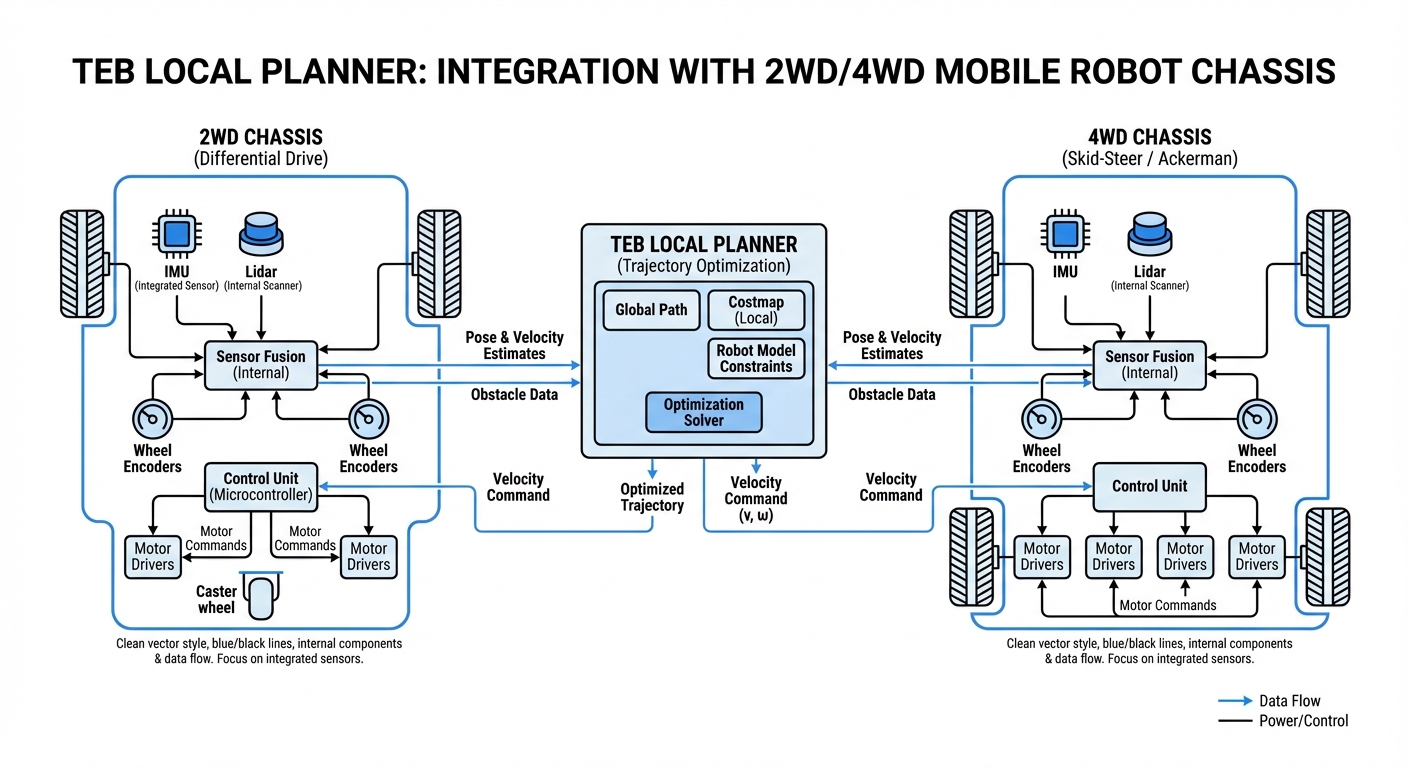
TEB Local Planner bridges global pathing and motor controls. Ditches DWA's velocity sampling for a full multi-goal optimization puzzle.
It grabs global waypoints and spins them into a hyper-graph: nodes for poses and time slices, edges for rules like speed caps, obstacle gaps, and body feasibility.
Crunching a lean equation set live via g2o, it pulls the path tight for max speed, shoves from obstacles, delivering buttery motion over the herky-jerky of sample planners.
Real-World Applications
Warehouse Forklifts
Ideal for Ackermann forklifts in skinny aisles, locking turns tight to dodge racks.
Hospital Delivery Robots
Smooth sailing around patients and gear—the parallel path tricks help pick left or right past gurneys.
Outdoor AMRs
Powers last-mile bots on sidewalks, mastering 4-wheel steering and dodging walkers like a pro.
Industrial Manufacturing
Keeps heavy omni platforms hustling in factories, time-optimized to avoid production jams.
Frequently Asked Questions
What's the core difference between TEB and DWA local planners?
DWA samples velocities, simulates ahead for safe paths—cheap compute but often suboptimal and bumpy. TEB optimizes the full local trajectory for smoother, quicker, kinematics-true paths, though it guzzles more CPU.
Can TEB Local Planner handle car-like (Ackermann) robots?
Yep, one of TEB's standout features! It natively handles non-holonomic kinematic constraints, like minimum turning radii. Just set the `min_turning_radius` parameter and configure your robot's footprint model, and the planner will spit out valid maneuvers perfect for car-like vehicles.
How computationally expensive is TEB compared to other planners?
TEB is more computationally demanding than DWA since it tackles a sparse hyper-graph optimization problem every control cycle. That said, on modern embedded hardware like NVIDIA Jetson or Intel NUC, it runs great at 10-20Hz. You can fine-tune optimization parameters to balance speed and path quality just right.
Does TEB support omnidirectional (holonomic) robots?
You bet! Crank `max_vel_y` above zero and tweak the holonomic weights, and TEB will craft paths that make full use of strafing. It's ideal for mecanum-wheeled robots, letting them slide sideways or diagonally to shave time and dodge obstacles better.
What happens if the robot gets stuck in a local minimum?
Like other gradient-based optimizers, TEB can hit local minima. But it counters this with "Homotopy Class Planning," juggling and optimizing multiple unique trajectories at once. If the main path gets blocked or isn't optimal, it seamlessly swaps to a better one.
How does TEB handle dynamic obstacles like walking humans?
TEB constantly refreshes its optimization graph using the local costmap. Spot an obstacle in the way? The "elastic band" gets pushed aside by the obstacle costs. For predictable movers, it even uses velocity estimates to plot paths that skirt future collisions.
What inputs does the TEB planner require to function?
TEB needs a global plan (waypoints from a global planner like Dijkstra or A*), odometry data (your robot's current position and velocity), and a local costmap (obstacles from LIDAR/camera). It's typically a plugin for the ROS Navigation Stack or Nav2.
How difficult is it to tune the parameters for TEB?
Tuning can feel overwhelming with so many parameters (velocity/accel limits, weights for time vs. clearance, obstacle inflation, etc.). Start with the built-in presets for your robot type, then tweak weights bit by bit to nail the driving behavior you want.
Can TEB handle backing up / reverse motion?
Absolutely. TEB will automatically plan reverse moves if they're smarter or needed to wriggle out of a tight spot. Dial it in with the `weight_kinematics_forward_drive` parameter—lower values encourage reversing, while cranking it high enforces forward-only driving.
Is TEB Local Planner open source?
Yes, TEB Local Planner is fully open source and readily available for ROS (Robot Operating System) and ROS 2. Community and researchers keep it thriving, making it a budget-friendly, rock-solid choice for commercial and research robotics.
How does the planner handle narrow doorways?
TEB excels in cramped spaces because it doesn't just collision-check at points—it optimizes the whole trajectory to stay centered. Just ensure your footprint model is accurate and `min_obstacle_dist` is spot-on, so it doesn't bail thinking it's impossible.